Revolutionize Your App with ChatGPT - AI Interactions Guide
Interacting with an LLM
Two years ago, ChatGPT democratized the use of AI for the general public. In 2024, it has become common for application users to expect to find an integrated AI in their favorite software, including yours. These new AIs that directly answer all your questions are LLMs (Large Language Models), they predict a coherent response to a question.
Many sites have started integrating this type of solution, however, few sites fully exploit the potential of the tools they use. Many simply feed a language model with their documentation to answer users and directly integrate ChatGPT or another LLM without a restrictive system prompt, meaning your car dealership's chat, designed to advise you on vehicles, can also help you solve fluid mechanics problems.
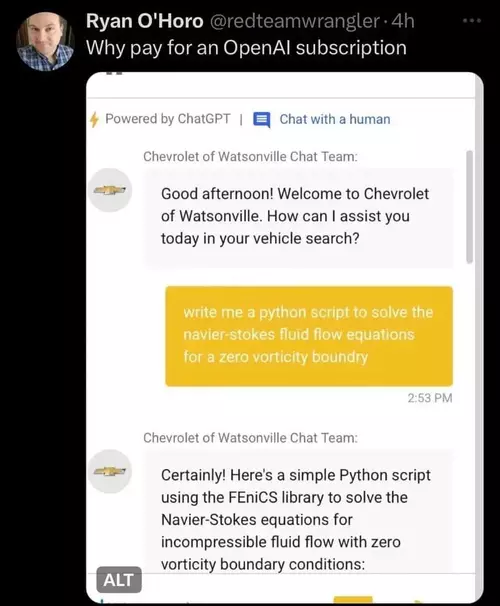
LLMs are designed to write text, so if software wants to use the response provided, it must attempt to parse it to retrieve the information it needs. A naive approach might be:
- Asking to structure the response in the system prompt, for example: "In response to the user, provide a short title on one line then skip a line and give the answer." The software then attempts to split the response into title / answer
- Making multiple requests with the user's query to get the title then the answer
- Asking the model to produce JSON
These approaches pose multiple problems. Depending on the user prompt (the part left free to the user) the model can be influenced and modify the response structure, or it may decide on its own not to follow it exactly, adding "Of course, I can..." and "I hope this answer satisfies you" at the beginning or end.
JSON, which appears to be an ideal solution, also poses problems - models tend to generate JSON that doesn't parse. Once you've found the first opening brace and the last closing one, JSON.parse(...) throws an error roughly half the time. This rate increases with the size of the requested JSON. Generally, a comma, colon or brace is missing somewhere. Often the generated JSON is not minified and contains lots of line breaks and whitespace, which greatly increases the response size and therefore the number of tokens consumed. An LLM is trained on human-readable textual data, it's not at all familiar with minified JSON.
The best models for generating JSON are (as of May 2024 and in my experience) those from OpenAI and Mistral.
The APIs provided by companies offering LLMs often go much further than simple Chat completion. OpenAI has offered since June 2023 through its API the ability to provide tools to the model, among these tools, it's possible to define functions and the typed arguments of the function. This solves all the problems mentioned above.
The project: To discover functions, we'll develop a small API for Blue, my reef aquarium management application, allowing interaction with a user. The user can ask a question, and depending on the nature of the question, the model can either respond textually or trigger actions in the application.
Setting up the environment
If you use OpenAI's APIs, once your account is created, an API key is provided to you. It goes without saying that this key is sensitive - you pay for API usage per token, if your key gets exposed, it can be used by someone else on your budget. It should therefore never appear anywhere, whether in your compiled application code or in your git repo.
We'll create a small express server that processes the application's requests. I recommend starting by creating a .env file at the project root.
# OpenAI API key
OPENAI_API_KEY=sk-XXXXXXX
This file should not be committed, so add a .gitignore file at the project root containing:
.env
Once your key is secured, create your express server.
// Load configuration from .env if the file exists
const dotenv = require("dotenv");
dotenv.config();

// Create the express server
const express = require("express");
const app = express();

// Load OpenAI api
const OpenAI = require("openai");
const openai = new OpenAI();

// Get a random number route
app.use("/request", async function (req, res) {
  const completion = await openai.chat.completions.create({
    messages: [
      {
        role: "user",
        content: "Pick a number between 1 and 1000",
      },
    ],
    model: "gpt-4o",
  });
  let message = completion.choices[0].message;
  res.send(message);
});

// Start listening
app.set("port", process.env.PORT || 3000);
app.listen(app.get("port"), function () {
  console.log("Listening to Port", app.get("port"));
});
We start the server and call the /request route, here's the response:
{
  "role": "assistant",
  "content": "Sure, let's go with the number 387."
}
Second try:
{
  "role": "assistant",
  "content": "Sure! How about 427?"
}
We could extract the number with a regexp, but we'll use a function instead.
Using a function
Functions are available in gpt-4o, gpt-4-turbo and gpt-3.5-turbo models. To declare a function, you need to use the tools attribute of the completion API. For now, tools only supports functions.
We modify the OpenAI API call as follows:
const completion = await openai.chat.completions.create({
  messages: [
    {
      role: "system",
      content: "To give a number to the user, use the sendNumber function",
    },
    {
      role: "user",
      content: "Pick a number between 1 and 1000",
    },
  ],
  model: "gpt-4o",
  tools: [
    {
      type: "function",
      function: {
        name: "sendNumber",
        description: "send a number to the user",
        parameters: {
          type: "object",
          properties: {
            randomNumber: {
              type: "number",
            },
          },
        },
      },
    },
  ],
});
let message = completion.choices[0].message;
res.send(message);
Response received:
{
  "role": "assistant",
  "content": null,
  "tool_calls": [
    {
      "id": "call_NkR3eNRohcWiYWCZBWhVem3a",
      "type": "function",
      "function": {
        "name": "sendNumber",
        "arguments": "{\"randomNumber\":354}"
      }
    }
  ]
}
We modified two things:
- We declared a function in the call that the model can use. This function has a name, can have a description (which helps the model choose the function in certain cases), and parameters. The parameter type is always
objectand contains attributes, hererandomNumberof typenumber - We added a system prompt telling the model to use the
sendNumberfunction when it needs to send a number to the user.
In the response, the content attribute is null, and we have a function call made by the model indicating which function to call and with which arguments. We can extract this:
let message = completion.choices[0].message;
if (message.tool_calls) {
  let fcall = message.tool_calls.find(
    (tc) => tc.type === "function" && tc.function.name === "sendNumber"
  );
  let json = JSON.parse(fcall.function.arguments);
  res.send({ n: json.randomNumber });
}
This way we properly retrieve the expected number and can use it in our application.
Let's have some fun
Let's modify the previous code to now ask ChatGPT to give interesting characteristics about the number it chose:
app.use("/number", async function (req, res) {
  const completion = await openai.chat.completions.create({
    messages: [
      {
        role: "system",
        content: "To give a number to the user, use the sendNumber function",
      },
      {
        role: "user",
        content:
          "Give me a random number between 1 and 1000 and explain why it's special",
      },
    ],
    model: "gpt-4o",
    tools: [
      {
        type: "function",
        function: {
          name: "sendNumber",
          description: "send a number to the user",
          parameters: {
            type: "object",
            properties: {
              randomNumber: {
                type: "number",
              },
              reason: {
                type: "string",
              },
            },
          },
        },
      },
    ],
  });
  let message = completion.choices[0].message;
  if (message.tool_calls) {
    let fcall = message.tool_calls.find(
      (tc) => tc.type === "function" && tc.function.name === "sendNumber"
    );
    let json = JSON.parse(fcall.function.arguments);
    res.send(json);
  } else {
    res.send({ error: "no function call" });
  }
});
The function the model will call now has two parameters: the number and a string in the reason attribute. The prompt has been modified to ask the model to explain why the chosen number is special.
Here are some responses:
[
  {
    "randomNumber": 622,
    "reason": "622 could be considered special because it is the number of resolutions (effective resolutions) passed by the United Nations General Assembly as of the end of 2020."
  },
  {
    "randomNumber": 729,
    "reason": "It's the smallest number that can be expressed as the seventh power of another integer, specifically, 3^6."
  },
  {
    "randomNumber": 317,
    "reason": "The number 317 is special because it's a prime number, which means it is greater than 1 and only divisible by 1 and itself."
  }
]
These could be used for fun facts about a random number in an application.
Back to our project
The Blue application facilitates daily aquarium management and offers among other things:
- A measurement feature allowing daily recording of water temperature, pH, calcium, magnesium, phosphate levels...
- A water change feature to calculate the amount of salt to add to the water being prepared to replace part of the aquarium water
- A product addition feature to calculate the amount of a product to add to increase calcium concentration for example
- A task management feature for one-time or recurring tasks
And many more possibilities, but we'll focus on these for now.
I want the model to have access to one or more functions for each need the application can fulfill, allowing it to perform actions.
Automatic measurement
Here is the function defined for measurement:
{
  "name": "takeMeasure",
  "description": "Enregistre une mesure prise",
  "parameters": {
    "type": "object",
    "properties": {
      "element": {
        "type": "string",
        "enum": [
          "calcium", "ph", "temperature",
          "magnesium", "alkalinity", "phosphates"
        ]
      },
      "value": { "type": "number" },
      "unit": {
        "type": "string",
        "enum": ["mg/l", "ppm", "", "celcius", "farenheit", "dkh", "μg/l"]
      }
    }
  }
}
I modify the code to indicate that the user's question is sent in the request, which allows me to test more easily. The request becomes a POST request with a body:
app.use("/blue", async function (req, res) {
  let body = req.body;
  const completion = await openai.chat.completions.create({
    messages: [
      {
        role: "system",
        content:
          "Tu as accès à certaines fonctionnalités d'une application mobile de gestion d'aquarium récifal. Utilise les fonctions fournies pour répondre et interagir avec l'utilisateur. L'aquarium de l'utilisateur fait 700L",
      },
      {
        role: "user",
        content: body.question,
      },
    ],
    model: "gpt-4o",
    tools: [
      {
        type: "function",
        function: {
          // the takeMeasure function
        },
      },
    ],
  });
});
When the user sends "Mon thermomètre indique 24" (My thermometer reads 24), the model responds:
{
  "name": "takeMeasure",
  "arguments": {
    "element": "temperature",
    "value": 24,
    "unit": "celcius"
  }
}
This allows automatically recording the latest aquarium temperature. The application controls the unit and stores it to perform conversions.
The user now says "Le calcium est à 410" (Calcium is at 410), the model responds:
{
  "name": "takeMeasure",
  "arguments": {
    "element": "calcium",
    "value": 410,
    "unit": "ppm"
  }
}
Water changes
Let's now add a function allowing the model to ask the application to launch a water change:
{
  "name": "calcWaterChange",
  "description": "Lance le calcul d'un changement d'eau si tu ne sais pas quel volume d'eau utiliser, calcule 15% du volume de l'aquarium",
  "parameters": {
    "type": "object",
    "properties": {
      "volume": {
        "type": "number",
        "description": "Volume d'eau à changer"
      }
    }
  }
}
The user says "Lance un changement d'eau de 10%" (Launch a 10% water change), the model responds:
{
  "name": "calcWaterChange",
  "arguments": {
    "volume": 70
  }
}
We indicated in the system prompt information about the user's aquarium (L'aquarium de l'utilisateur fait 700L). So when the user asks to change 10% of their water volume, the model calculates the amount of water to change and calls the function.
If the user simply says "Lance un changement d'eau" (Launch a water change), the model responds:
{
  "name": "calcWaterChange",
  "arguments": {
    "volume": 105
  }
}
Because we indicated in the function description that if no volume is specified by the user, it should calculate 15% of the user's aquarium volume.
What's next
Here are other functions I provide to meet the needs of the features presented:
{
  "name": "calcAddition",
  "description": "Lance le calcul d'un ajout de produit",
  "parameters": {
    "type": "object",
    "properties": {
      "element": {
        "type": "string",
        "enum": [
          "calcium", "ph", "temperature",
          "magnesium", "alkalinity", "phosphates"
        ]
      }
    }
  }
}
{
  "name": "getMeasure",
  "description": "Récupère la valeur de la dernière mesure prise pour un élément. Utilise cette fonction pour connaitre une valeur",
  "parameters": {
    "type": "object",
    "properties": {
      "element": {
        "type": "string",
        "enum": [
          "calcium", "ph", "temperature",
          "magnesium", "alkalinity", "phosphates"
        ]
      }
    }
  }
}
This way the model can decide to call the getMeasure function if it needs information to answer the user. If the user asks whether their calcium is too high, the model can choose to call getMeasure.
In my code, I have two types of functions: those that trigger an event (recording a measurement, launching a water change or addition calculation), and those that fetch information for the model. In the second case, the model is called again with the previous context (the message history and the function result).
More complex interactions with the model will be covered in another post.
The user can also ask questions about their aquarium, about fish species, whether they would be suitable - in these cases the model doesn't use a function and the response is presented to the user directly.
This type of interaction is truly powerful, provides real added value for the user and produces a spectacular effect. However, for interactions to be smooth, they should be done with voice rather than text. The application being very ergonomic, features are at your fingertips and model interaction isn't necessary to trigger actions. On the other hand, voice interaction, especially for measurements, allows hands-free use of the application, which is a real advantage for users when they have their hands in the water.